A Kafka event is a record that something happened in your business, such as an order being placed or a basket being updated. The Apache Kafka documentation describes an event (also called a record or message) as having a key, a value, a timestamp and optional metadata headers. Producers append events to topics, and consumers read them as often as they need, because Kafka keeps events for as long as each topic’s retention setting allows rather than deleting them after they are read.
Two Kafka behaviours shape every design decision in this guide. First, topics are split into partitions, and events with the same key always land in the same partition. Second, Kafka only guarantees ordering within a partition. So the key you choose decides which events stay in order relative to each other, and the payload you choose decides how much work every consumer has to do.
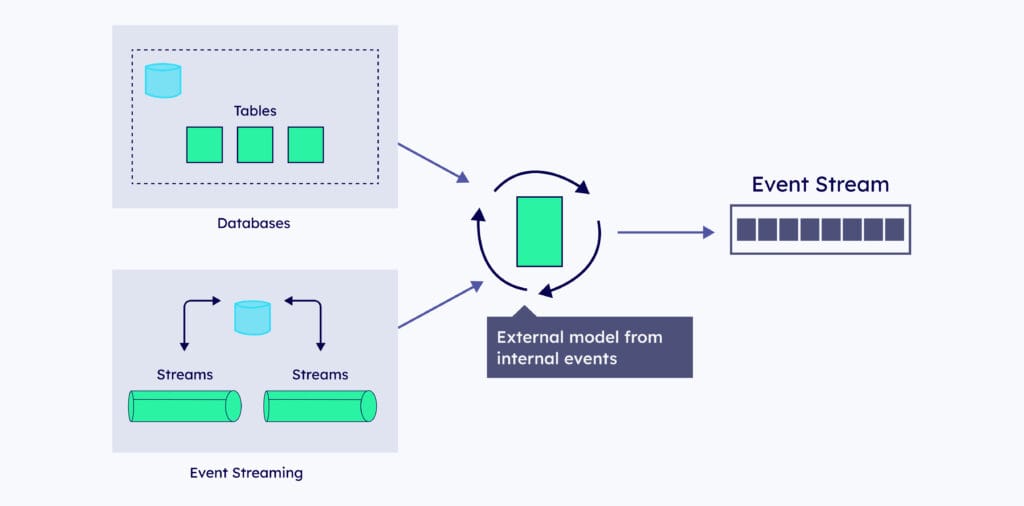
Internal data from databases and streams is shaped into an external model before it is published as an event stream.
Event design matters because an event stream is a contract. Once other teams build on a topic, changing its events is as hard as changing a public API. For the wider architecture these events sit in, see our guide to designing event-driven architectures.
What are the four dimensions of Kafka event design?
Most event design problems come down to four trade-offs. Making them deliberately, topic by topic, avoids streams that are hard to consume or impossible to evolve.
Dimension
The choice
What it affects
Event composition
Fact (full state) or delta (just the change)
Payload size and how much state consumers must rebuild
Relationships
Normalised or denormalised
Whether consumers need stream joins
Topic layout
One event type per topic or several
Ordering across event types and schema management
Event flow
Discrete or continuous
Whether each event stands alone or depends on earlier ones
The rest of this guide takes each dimension in turn, then puts them together in a worked Kafka event example.
Should you use fact events or delta events?
A fact event records the complete state of an entity at a point in time, much like a row in a database. A fact event for a shopping basket carries the basket ID, every item with its product code and quantity, and the chosen delivery option. This pattern is often called event-carried state transfer: consumers get the full current state without piecing it together from earlier events.
A delta event records only what changed. An item_added_to_basket event carries the basket ID, the product code and the quantity added, but not the rest of the basket. Deltas are small and describe intent clearly, but any consumer that needs the current state has to replay and combine them in order.
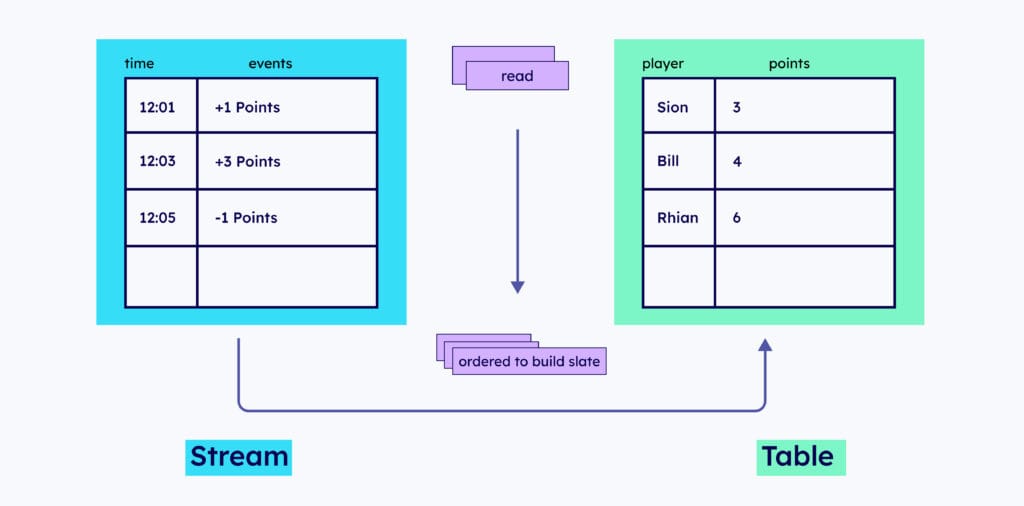
Delta events form a stream of changes; reading them in order builds the current state, which is what a fact event carries.
Fact event
Delta event
Carries
Full current state of the entity
Only the change and why it happened
Best for
Sharing state with other teams and systems
Reacting to specific actions, such as a low-stock alert
Consumer effort
Low: read the latest event per key
Higher: replay deltas in order to rebuild state
Payload size
Larger
Smaller
Kafka fit
Compacted topics and Kafka Streams KTables
Event sourcing inside a service, with ordering by key
Fact events pair naturally with log compaction. Kafka’s documentation explains that compaction retains at least the last known value for each key in a partition, so a compacted topic of fact events doubles as a snapshot that a new consumer can load from the start. Note that compaction runs in the background and does not guarantee exactly one record per key at any moment, so consumers should still treat the latest event per key as the truth.
Hybrid events combine both: the full new state plus a field explaining what changed. They cost more bytes, but they suit consumers that want both the state and the reason.
Key takeaway: Use fact events for data you share across teams and delta events for actions you want others to react to. Key both by the entity ID so every event for that entity stays in order.
Should Kafka events be normalised or denormalised?
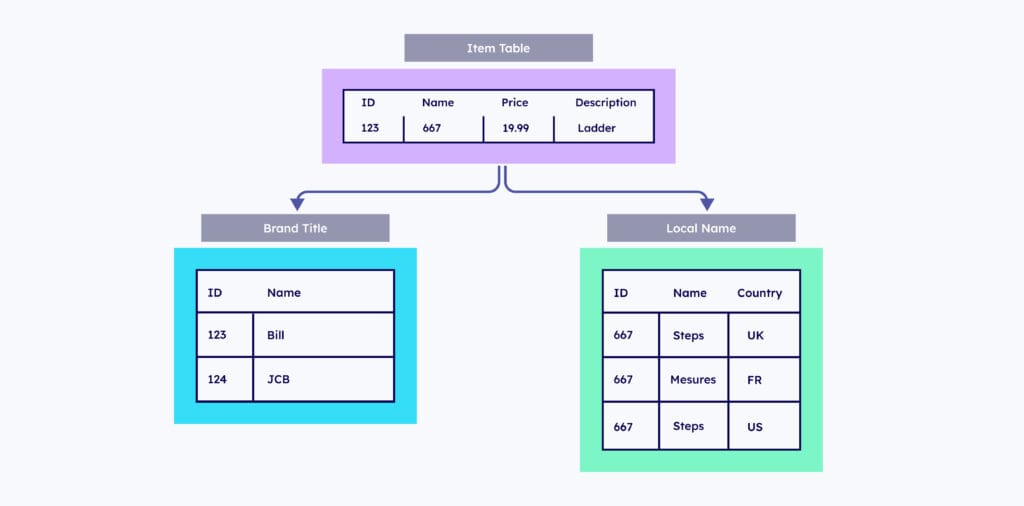
Normalised events mirror a relational model: an item event refers to a brand by ID and to localised names by ID, and each lives on its own topic. That keeps every topic small and avoids duplicated data, but every consumer that needs a readable item now has to join several streams. Stream joins are powerful in Kafka Streams and Apache Flink, but they add state, latency and operational work, and many sink systems cannot join streams at all.
A normalised model splits an item across item, brand and localised name tables that consumers must join back together.
Denormalised events carry the related data inside one self-contained payload, so the item event already includes its brand name and localised names. You can denormalise before publishing, in the producing service or an outbox layer that shields consumers from the internal data model, or after publishing with a stream processor that enriches the raw events into a new topic.
Weigh three factors when you choose:
Consumer needs: denormalised events are far easier for consumers, particularly tools that cannot join streams.
Cost of change: a widely shared field, such as a brand name, can trigger a burst of denormalised updates when it changes.
Coupling: publishing normalised internal tables, as raw change data capture often does, ties consumers to your private schema. A curated, denormalised external event decouples them.
If you are streaming database changes with Debezium, our guide to CDC transaction consistency with Debezium covers how to turn row-level changes into consistent business events.
Should a Kafka topic hold one event type or many?
One event type per topic is the simplest option and the default for most teams. Confluent Schema Registry’s default subject naming strategy, TopicNameStrategy, ties one value schema to each topic, so compatibility is checked across every event on that topic.
Several event types on one topic make sense when consumers need those events in a strict order. Kafka only orders events within a partition, so order_placed, order_paid and order_shipped on three separate topics can be read out of order, while the same events on one topic, keyed by order ID, stay in sequence. Schema Registry supports this with RecordNameStrategy or TopicRecordNameStrategy, or with schema references that combine several event types under one topic’s subject.
The cost is that every consumer must handle every event type on the topic, and some tools only support the default strategy; Confluent’s documentation notes, for example, that ksqlDB uses only TopicNameStrategy. We cover the patterns and their trade-offs in more depth in multiple message types in Kafka topics and how to manage schemas in Apache Kafka.
Are your event streams discrete or continuous?
A discrete event stands on its own: a consumer can act on a single payment_failed event without reading anything else. Discrete events suit notifications, alerts and triggers for workflows.
A continuous event flow only makes sense as a sequence, such as sensor readings, price ticks or the steps of a user session. Consumers aggregate or window these events over time, so ordering, timestamps and late-arriving data matter far more than the content of any single event. For continuous flows, use event time from the event itself rather than the time it was processed, and key events so that each sequence stays in one partition.
Knowing which kind you have tells you what consumers need: discrete events need clear, self-describing payloads, while continuous flows need consistent keys, reliable timestamps and a stream processor such as Kafka Streams.
What does a well-designed Kafka event example look like?
Here is a fact event for a shopping basket that follows the guidance above. It is keyed by basket ID, carries the full current state, is denormalised so consumers do not need joins, and includes the reason for the change.
A few details make this event easier to live with:
The Kafka key is basket_id, so every update to a basket stays in order in one partition.
event_id lets consumers deduplicate if the producer retries.
occurred_at records business time, separate from Kafka’s own record timestamp.
Money is a string or decimal type, never a floating-point number.
A registered schema (Avro, Protobuf or JSON Schema) with a compatibility rule protects consumers as the event evolves.
For the producer settings that make delivery safe, such as idempotence and acks=all, see our Kafka producer best practices.
How do you keep internal and external events apart?
Inside a service, you can model events however suits that service, including fine-grained deltas for event sourcing. Events that leave the service are a different matter: they are a published interface that other teams depend on.
Keep the two apart. Publish a curated external event, usually a denormalised fact or a well-named business event, and keep internal events on private topics. That lets a team refactor its internal model without breaking anyone downstream. Document each external topic’s owner, key, schema and compatibility rule, and treat a breaking change as a new event version or a new topic rather than an in-place edit.
If you want a second opinion on your event model or topic design, OSO’s Kafka consulting services and Kafka support teams review event designs for production platforms.
Frequently asked questions
What is a Kafka event?
A Kafka event is a record that something happened, stored in a Kafka topic. Each event has a key, a value, a timestamp and optional headers. Events with the same key go to the same partition, where Kafka keeps them in the order they were written.
What is the difference between a fact event and a delta event?
A fact event carries the complete current state of an entity, while a delta event carries only what changed. Fact events are easier for consumers to use and suit compacted topics. Delta events are smaller and describe intent, but consumers must replay them in order to rebuild state.
Should I put multiple event types in one Kafka topic?
Put multiple event types in one topic only when consumers need them in a strict order. Kafka orders events only within a partition, so related events for the same entity must share a topic and key to stay in sequence. Otherwise, one event type per topic is simpler to manage.
How should I choose a Kafka event key?
Choose the ID of the entity whose events must stay in order, such as an order, basket or account ID. Events with the same key go to the same partition, which preserves their order. Avoid keys with very few values, because they concentrate traffic on a small number of partitions.
Do Kafka events need a schema?
Yes, any event shared between teams should have a registered schema. A schema registry with a compatibility rule, such as backward compatibility, stops producers from publishing changes that break existing consumers. Avro, Protobuf and JSON Schema are all widely used formats.
Should Kafka events be normalised or denormalised?
Denormalise events you publish for other teams, so consumers get a self-contained payload without stream joins. Normalised events keep topics small and avoid duplicated data, but every consumer then has to join streams, which adds state and latency.