An Automated Tool for End-to-End MSK ZooKeeper-to-KRaft Migration
Sion Smith7 May 2026
Blogs11 mins read
Amazon MSK version 3.9.x is still the bridge release that supports both ZooKeeper and KRaft metadata modes. Kafka 4.x on MSK is KRaft-only. Since August 2026, AWS also supports in-place migration from ZooKeeper to KRaft on eligible 3.9.x clusters via the familiar version-upgrade workflow (3.9.x.kraft). That path keeps the cluster available and does not move topic data.
In-place is not always enough. Teams still choose a blue/green move to a new KRaft cluster when they need a signed audit trail, a hard rollback target until cutover, a topology redesign, or when the cluster fails the in-place prerequisites (for example three Availability Zones, no kafka.t3.small, ZooKeeper client access disabled on Standard brokers). That is the gap this article covers.
OSO engineers built kafka-backup as the open-source foundation for that work. The Enterprise MSK ZooKeeper-to-KRaft migration feature adds cutover, validation and cryptographic evidence so a platform team can prove what happened. This refresh walks through the architecture—design principles, S3 data flow, offset translation, cutover protocol and the evidence bundle—so you know what the tool does before you point it at production. For the broader migration landscape, see our guide to ZooKeeper-to-KRaft migration.
Path
When it fits
What you get
AWS in-place (3.9.x → 3.9.x.kraft)
Eligible 3.9.x ZooKeeper cluster; clients already use bootstrap servers
Metadata migrates in place; no data copy; irreversible once complete
Automated cluster-to-cluster tool
New KRaft cluster, audit evidence, rollback until cutover, or in-place not eligible
S3 seed/tail, offset map, seven-step cutover, five-check validation, signed evidence
What design principles should an MSK ZooKeeper-to-KRaft migration tool follow?
Every architectural decision in the migration tool follows from three design principles:
No in-place migration (for this tool). S3 is the replication channel between source and target. The source cluster is never modified—it remains a safe rollback target until you decide to decommission it. That is what makes the migration recoverable from anything short of cutover itself. (AWS’s separate in-place path is different: once it finishes, you cannot switch back to ZooKeeper.)
Deterministic state machine. Every phase transition is journaled. The migration can be resumed from any point, rolled back before cutover, or audited afterwards from the evidence bundle. The journal is the source of truth—not a shell-script improvisation.
Offset continuity over offset identity. Target offsets will differ from source offsets; that is normal Kafka behaviour driven by compaction and replication timing. What matters is that consumers resume from the same message on the new cluster. The offset map is the artifact that translates between the two.
Those three principles are the difference between a Kafka data-copy utility and an MSK migration tool.
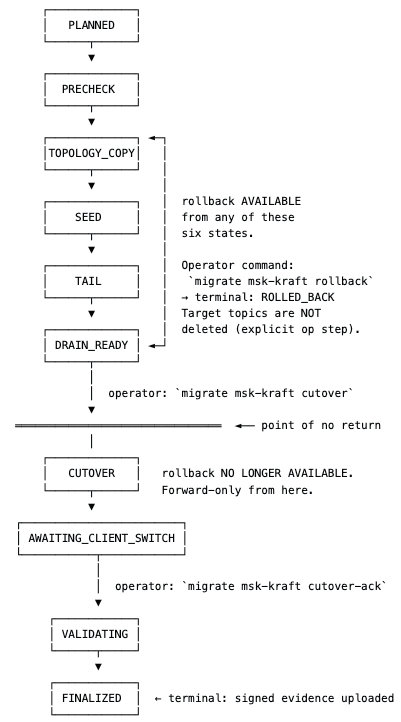
How does the 11-state machine keep the migration recoverable?
TopologyCopy — creates topics and ACLs on the target.
Seed — bulk data transfer through S3.
Tail — continuous replication from the seed boundary up to cutover.
DrainReady — lag has converged; waiting for an operator.
Cutover — freeze, sentinel publish and offset translation.
AwaitingClientSwitch — waiting while applications switch to the new bootstrap servers.
Validating — five-check suite.
Finalized — terminal; evidence signed and uploaded.
RolledBack / Failed — alternative terminal and resumable failure states.
Every transition appends an entry to journal.jsonl with from-state, to-state, timestamp and reason. On resume, the tool reads the journal tip and re-enters: planned-through-tail resume from the last non-failed state; DrainReady and AwaitingClientSwitch return exit code 10 (“waiting for operator”); Failed walks backward up to four hops to find a safe re-entry point. The first journal entry embeds a resume fingerprint (SHA256 of source ARN, target ARN and bucket names). On resume the fingerprint is verified so a silent config change—pointing at a different target by mistake—cannot continue unchallenged.
How does the seed phase copy MSK data through S3?
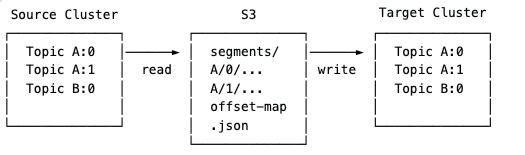
The seed phase performs a bulk copy of all source data through S3, decoupling source and target through durable intermediate storage.
Seed phase
Two engines do the work. BackupEngine reads from source partitions and writes S3 segments (each up to segment_max_bytes). RestoreEngine reads those segments and produces them to target partitions. Between them, the offset map sidecar records, per partition, the relationship between source ranges [src_first, src_last] and target ranges [tgt_first, tgt_last]. The map lives at s3://<evidence_bucket>/<evidence_prefix>/<migration_id>/offset-map.json from the moment seed begins.
The phase runs max_concurrent_partitions transfers in parallel (default 4, configurable for high partition counts). Because S3 sits between the clusters, neither is exposed to the other’s throughput limits. Failures on either side leave the durable S3 segments intact. For backup and restore patterns beyond migration, see how to backup Kafka Schema Registry and our notes on building disaster recovery for Apache Kafka.
How does the tail phase close the gap to cutover?
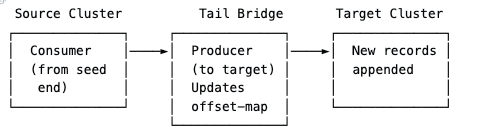
After seed completes, the tail phase bridges the gap between the seed snapshot and real time:
Tail phase
Tail is a direct consumer-to-producer bridge. It consumes from the source starting at the seed end offsets, produces to the target, and updates the offset map as new records flow. It tracks per-partition lag (source LEO − consumer position) and declares drain_ready when every partition has stayed within drain_max_partition_lag for drain_stable_window. Progress checkpoints to S3, so on resume tail continues from the checkpoint rather than re-streaming from seed offsets.
What happens in the seven-step cutover protocol?
Cutover is the seven-step phase that locks in offset continuity. The state machine enforces the sequence:
Producer freeze — via webhook into the application control plane, or manual confirmation. Creates a stable end-of-source boundary.
Sentinel records — a sentinel is published to every partition on the source.
Sentinel drain — tail keeps running until every sentinel has replicated to the target, proving the target holds every record up to the migration boundary.
Offset translation — for each consumer group’s committed offset on each partition, the tool applies arithmetic translation from the offset map (source_first / target_first), with explicit handling for edge cases such as offsets before the copied range.
Offset commit on target — translated offsets are committed via the Kafka OffsetCommit API so reconnecting consumers already sit on the right message—no auto.offset.reset gamble.
Pre-switch verification — target earliest/latest offsets are checked so retention or DeleteRecords truncation cannot hide behind a latest-offset-only drain check (including CreateTime retention truncating restored records).
Ready for client switch — the tool logs READY_FOR_CLIENT_SWITCH and waits in AwaitingClientSwitch while operators repoint bootstrap servers.
What does offset continuity mean in practice?
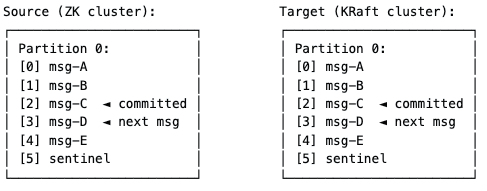
After cutover, the consumer group’s committed offset points to the same message content on both clusters. When the consumer reconnects to the target, it reads the next message exactly where it left off on the source. Offset numbers may differ (compaction, replication timing, the sentinel itself), but the offset map keeps the translation correct. That is what offset continuity means in practice—and why MirrorMaker-style copies without an offset map leave operators guessing at cutover.
Offset continuity
How are ACLs and IAM handled during MSK KRaft migration?
Authorisation is a first-class concern, not a manual post-step. ACL bindings are enumerated from the source via DescribeAcls and filtered to remove MSK internals—User:ANONYMOUS, bindings on __consumer_offsets and __transaction_state, and the kafka-cluster:ClusterAction binding MSK auto-manages.
Unexpected ACL drift defaults to refuse in regulated environments so an operator reviews before the migration continues. When the target uses IAM authentication, Kafka ACLs do not apply. The tool generates an access-map.json mapping each source principal’s permissions to equivalent IAM actions for your infrastructure-as-code pipeline—it does not mutate IAM inside the AWS account. For teams whose ZooKeeper-mode MSK cluster is also their last SCRAM cluster, that turns two migrations into one planning exercise.
What is in the cryptographic evidence bundle?
When validation passes, finalisation produces the artifact compliance teams care about: an Ed25519-signed JSON document uploaded to S3. The payload includes migration ID, tool version, signed-at timestamp, configuration fingerprint, the full state-transition journal, source and target metadata snapshots, the migration plan, topology diff, ACL plan, seed and tail statistics, per-partition drain state, the cutover report (sentinel positions, freeze timing, offset translations) and the validation report with per-partition detail for all five checks.
Evidence lands at two S3 keys per migration: an attempt-scoped immutable key under evidence-attempts/ (including failed attempts) and a stable evidence.json alias for the current authoritative result. Uploads first attempt COMPLIANCE-mode Object Lock retention when the bucket supports it; otherwise the tool uploads without retention and logs a warning. A Slack thread and a few CloudWatch screenshots are not evidence a compliance team recognises. The signed bundle is.
How do resume and rollback work before cutover?
Two behaviours close the recoverability loop.
Journal-based state recovery. The journal loads from S3 (or a local directory), the tip state is determined, and execution re-enters from the right phase. Failed states walk backward up to four hops—capped to prevent oscillation. If recovery is not possible within four hops, the failure surfaces to the operator rather than churning silently.
Rollback. Available from planned, precheck, topology_copy, seed, tail and drain_ready—every state up to but not including cutover. Rollback verifies the resume fingerprint, best-effort unfreezes producers if needed, uploads rollback-report.json, appends the → rolled_back transition, and does not delete topics or data on the target. Target cleanup stays an explicit operator action. The hard rule: rollback is unavailable after cutover. Cutover is the irreversible moment, and the tool refuses to pretend otherwise.
Compare that to AWS in-place migration, which cannot be reversed once the cluster is on KRaft. Choose the path whose failure mode you can live with.
When should you use an automated MSK migration tool versus AWS in-place?
A bespoke MSK ZooKeeper-to-KRaft project—new cluster, MirrorMaker, reconciliation scripts, multi-team change window—often burns weeks and leaves no machine-verifiable evidence. Use AWS in-place when the cluster is eligible 3.9.x ZooKeeper, clients already use bootstrap servers, and you accept an irreversible metadata cutover with no parallel source cluster.
Use an automated cluster-to-cluster tool when you need a new KRaft cluster, signed evidence, a reversible window until cutover, or when in-place prerequisites fail. kafka-backup’s plan and precheck commands are free to run against production today—no licence, no signup—and they generate the runbook, IAM policy templates and cost estimate you need before you book a window. Deeper component detail lives in the architecture documentation. If you want hands-on help scoping either path, OSO’s Kafka support and fully managed Kafka teams run these migrations in production.
Key takeaway: Prefer AWS in-place ZooKeeper-to-KRaft on eligible MSK 3.9.x clusters when a simple metadata upgrade is enough; use an automated seed/tail/cutover tool with a signed evidence bundle when you need a new cluster, audit proof or a hard rollback target until cutover.
Frequently asked questions
Does Amazon MSK support in-place ZooKeeper-to-KRaft migration now?
Yes. Since August 2026 Amazon MSK supports in-place migration from ZooKeeper to KRaft on eligible clusters running Kafka 3.9.x in ZooKeeper mode, targeting 3.9.x.kraft through the version-upgrade APIs. The cluster stays available and topic data is not copied. Migration cannot be reversed once complete.
When should I still use a cluster-to-cluster MSK migration tool?
Use a blue/green tool when you need a new KRaft cluster, signed audit evidence, rollback by keeping the source until cutover, a topology redesign, or when the cluster fails in-place prerequisites such as three Availability Zones or unsupported broker types.
What is the automated MSK ZooKeeper-to-KRaft migration tool in this article?
It is the Enterprise MSK ZooKeeper-to-KRaft migration feature built on OSO’s open-source kafka-backup project. It owns S3 seed and tail replication, an 11-state journaled machine, offset-map cutover, ACL/IAM planning, five-check validation and an Ed25519-signed evidence bundle.
How does the offset map keep consumers continuous after cutover?
During seed and tail the tool records source-to-target offset ranges per partition. At cutover it freezes producers, publishes sentinels, translates each consumer group’s committed offsets with that map, and commits the translated offsets on the target before clients switch bootstrap servers.
Can I roll back after cutover?
Not with this tool, and not with AWS in-place migration either. Rollback is available only before cutover (planned through drain_ready). After cutover the change is treated as irreversible; plan validation and client-switch rehearsal accordingly.
Are the plan and precheck commands free?
Yes. Plan and precheck run against production clusters without a licence or signup. They produce the runbook, IAM policy templates and cost estimate you need to scope the window before you commit.