Updated November 2026: We have rewritten this guide in plain language and brought it up to date: it now covers KRaft (ZooKeeper was removed in Apache Kafka 4.0), how the producer picks a partition when there is no key, and follower fetching.
Why does Kafka sit at the centre of modern systems?
Apache Kafka is widely used for real-time data streaming and for communication between services. At OSO we help teams across Europe understand and run their Kafka clusters, and the same handful of concepts comes up in every engagement. This guide covers the basics you should understand before adopting an event-driven architecture.
The diagram below shows a simple microservices architecture with four services (Language, Account, Points and Progress) all connected to a single Kafka cluster.
Four microservices exchanging events through one Kafka cluster
Kafka, in the centre, acts as the hub. Each service publishes events to Kafka topics and subscribes to the topics it cares about, rather than calling the other services directly. This lets the services:
Operate and deploy independently
Exchange data asynchronously
Communicate without direct dependencies on each other
Process events in real time
This is a typical event-driven pattern: Kafka handles storage and delivery of events, which gives you loose coupling and room to scale. For a wider introduction, see what is Apache Kafka.
What are the core Kafka concepts?
Concept
What it is
Why it matters
Message (record)
A key, a value, a timestamp and optional headers, stored as bytes
Kafka does not care what is inside; your serialiser decides the format
Topic
A named stream of related messages, such as orders or payments
Producers write to topics and consumers read from them
Partition
An ordered, append-only log; each topic has one or more
Partitions are the unit of scaling and ordering
Offset
The position of a message within a partition
Consumers track their progress with offsets
Broker
A Kafka server that stores partitions and serves clients
A cluster spreads partitions across many brokers
Replica
A copy of a partition on another broker
Replication keeps data available if a broker fails
Producer
A client application that writes messages
Chooses the topic and, directly or via the key, the partition
Consumer group
A set of consumers sharing the work of reading a topic
Each partition is read by one consumer in the group
Controller (KRaft)
Brokers or dedicated nodes that manage cluster metadata
Replaced ZooKeeper; required from Kafka 4.0
Messages, keys and partitions
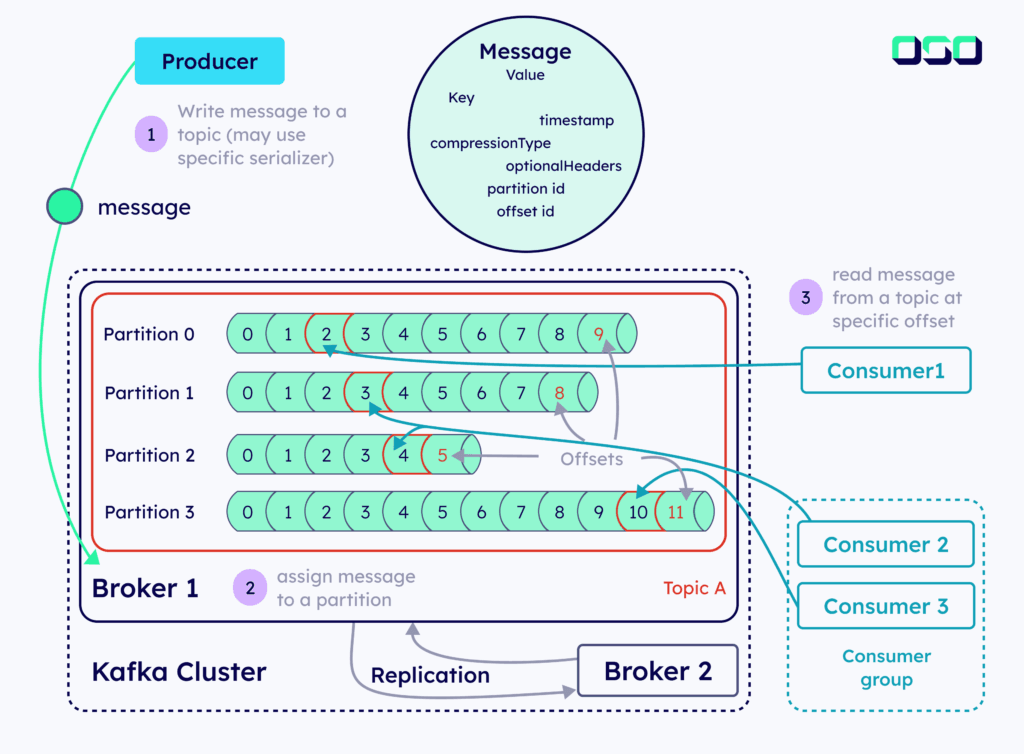
A message is the basic unit of data in Kafka. To Kafka it is just an array of bytes, so you can send JSON, Avro, Protobuf or anything else that can be serialised.
A message can carry a key. When it does, the default partitioner hashes the key to choose a partition, so all messages with the same key land in the same partition. Producers also batch messages heading to the same partition, which improves throughput.
Each partition is an append-only log. New messages are added at the end and consumers read from a given position forward. Kafka only guarantees ordering within a partition, not across a whole topic, so use a key (for example a customer ID) when related events must stay in order.
Keyed messages are routed to partitions of a topic
Partitions are how Kafka scales and provides redundancy. The partitions of one topic can live on different brokers, and each partition can be replicated to several brokers so a copy survives if one server fails. Read more in Kafka replication explained.
How do Kafka producers and consumers work?
Kafka clients play two roles. Producers create messages and publish them to a topic. Consumers read messages from topics and keep track of what they have read using offsets.
An offset is an always-increasing number that Kafka assigns to each message as it is written to a partition. Consumers commit the offset they have reached (Kafka stores these commits in an internal topic), so they can stop and restart without missing or re-reading data beyond their last commit.
Consumers work together in consumer groups. Within a group, each partition is assigned to exactly one consumer, so the group shares the work and no two members process the same partition at the same time. If a consumer fails or leaves, the group rebalances and another member takes over its partitions. A group can have at most as many active consumers as the topic has partitions; any extra consumers sit idle.
From Kafka 4.0, share groups add a queue-style alternative in which several consumers can read from the same partition. We cover them in our guide to Kafka queues and share groups.
What happens when a producer sends a message?
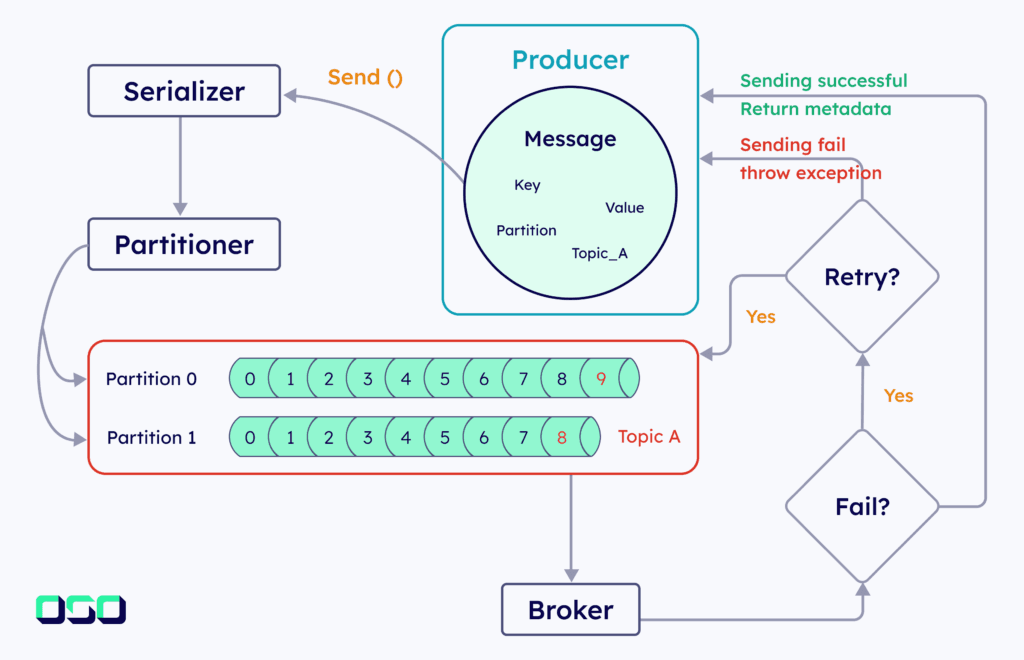
The steps a producer takes to send a message
Build the record. You need the destination topic and a value. You can also set a key, a specific partition, a timestamp and headers.
Serialise. The producer converts the key and value to bytes using the configured serialisers.
Choose a partition. If you set a partition, it is used. Otherwise the partitioner hashes the key. Messages without a key are spread across partitions by the sticky partitioner, which fills a batch for one partition before moving to the next.
Batch and send. Messages are grouped into batches per partition and sent to the leader broker for that partition.
Receive the result. When the broker acknowledges the write, the producer returns metadata giving the topic, partition and offset of the message, or an error if the write failed.
A broker is a single Kafka server. It receives messages from producers, assigns offsets, writes them to disk and serves them to consumers. A cluster is a group of brokers working together.
For each partition, one broker is the leader and the others holding a copy are followers. Producers always write to the leader, and followers copy its data so one of them can take over if the leader fails. Consumers read from the leader by default; since Kafka 2.4 they can also be configured to fetch from a follower in the same rack or availability zone, which can cut cross-zone traffic costs.
Cluster metadata, such as which broker leads each partition, is managed by the controller. Modern clusters use KRaft, where a small quorum of controllers stores this metadata in Kafka’s own log. ZooKeeper was removed entirely in Kafka 4.0, so any cluster still on ZooKeeper must migrate to KRaft before upgrading.
Kafka does not keep data forever by default. Each topic has a retention policy based on time (seven days by default) or size, after which old log segments are deleted. Alternatively, log compaction keeps only the latest message for each key, which suits topics that hold current state.
What message formats does Kafka support?
Kafka accepts any format that can be serialised to bytes. Common choices are Apache Avro, Protobuf and JSON Schema, because they define the structure of each message.
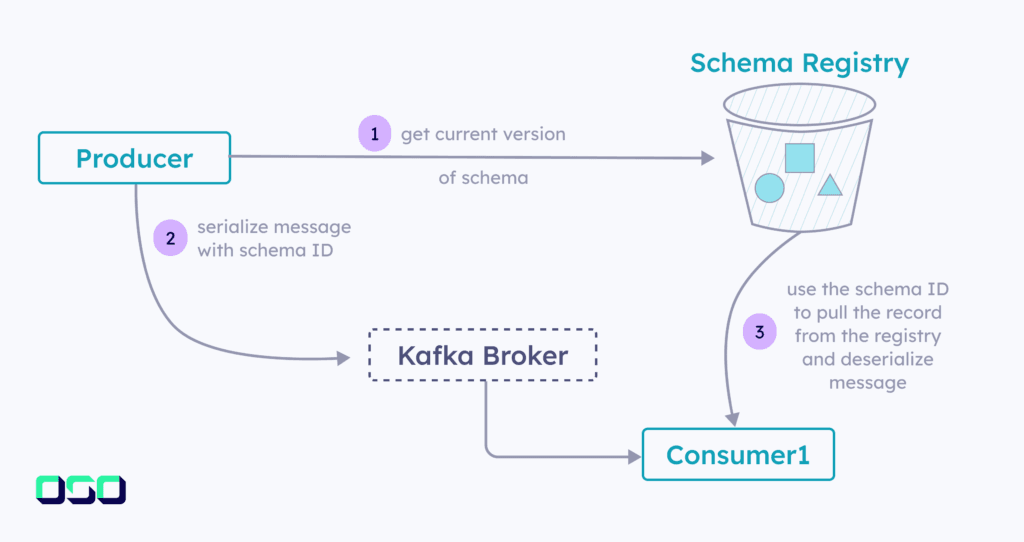
To share those structures between teams, many organisations run a Schema Registry. It runs as a separate service alongside Kafka and stores every approved version of each schema. Producers register or look up a schema and include a small schema ID in each message; consumers use that ID to fetch the schema and decode the message. Because the schema lives in a shared registry, producers and consumers can evolve independently without coordinating every change, as long as new versions follow the compatibility rules.
Producers and consumers share schemas through a Schema Registry
Key takeaway: Learn topics, partitions, offsets, brokers and consumer groups first. Partitions decide ordering and scale, replication decides resilience, and schemas decide whether teams can share data safely.
Frequently asked questions
What is the difference between a topic and a partition in Kafka?
A topic is a named stream of related messages. Each topic is split into one or more partitions, which are ordered append-only logs stored on brokers. Ordering is guaranteed within a partition but not across the whole topic.
How does Kafka decide which partition a message goes to?
If the producer sets a partition, that partition is used. If the message has a key, the default partitioner hashes the key so the same key always goes to the same partition. Messages without a key are spread across partitions in batches by the sticky partitioner.
What is a consumer group in Kafka?
A consumer group is a set of consumers that share the work of reading a topic. Each partition is assigned to one consumer in the group, and partitions are reassigned automatically if a consumer joins, leaves or fails.
Does Kafka still need ZooKeeper?
No. Apache Kafka 4.0 removed ZooKeeper, and clusters now use KRaft, in which Kafka controllers manage cluster metadata themselves. Older ZooKeeper-based clusters need to migrate to KRaft before upgrading to 4.0.
How long does Kafka keep messages?
By default Kafka keeps messages for seven days, then deletes old log segments. You can change retention per topic by time or size, or use log compaction to keep the latest message for each key.