Confluent Certified Developer for Apache Kafka :: Study Guide
Sion Smith12 November 2024
Blog18 mins read
Getting Apache Kafka certified can help you propel your career, whether you’re looking to find a new role, showcase your skills to take on a new project, or become your team’s go-to expert. And because Confluent Certification exams are created by experts in the relevant role or technical area, preparing for one of these exams helps you build the skills identified by skilled practitioners in the field.
Exam topic
What to master
Brokers
Produce and fetch request paths, purgatory, zero-copy
Replication
ISR, leaders and followers, leader epoch, high watermark
Control plane
KRaft metadata log, quorum leader election, snapshots
Reassignment, balancing, RAID vs JBOD, disaster recovery
What does the CCDAK exam cover?
We have all been there, trying to study for a subject we know nothing about, wondering if what we are learning or reading is actually going to turn up in the test. This guide outlines everything you will need to know to pass your Confluent Kafka Developer Certification (CCDAK).
We cover Apache Kafka’s core architecture, delving into server-side mechanics including request handling, partition-based message persistence, reliability safeguards and ordering guarantees. Features such as consumer group coordination, transactions, tiered storage, cluster elasticity and multi-region replication are examined. Kafka’s fundamental structure is emphasised: a real-time event streaming platform built on a distributed commit log. The Producer and Consumer APIs send and read messages, while the Connect and stream processing APIs (Kafka Streams and ksqlDB) support system integration and data transformation.
What are the key Kafka concepts?
Events: modelled as records with a timestamp, key, value and optional headers.
Topics: organise events of the same type, similar to database tables.
Partitions: distribute data within a topic across Kafka cluster nodes, serving as units of data distribution and parallelism.
Offsets: unique IDs for events in a partition, used to track event order.
How does a Kafka broker handle requests?
In a Kafka cluster, the control plane handles metadata, while the data plane manages client requests. Brokers handle two main request types: produce requests from producers and fetch requests from consumers.
How are produce requests processed?
Producers send records, which are assigned to partitions either by key hashing or, for records without a key, by the partitioner’s sticky or round-robin strategy.
Records are batched for efficiency and compression (depending on the configuration).
Batches form a producer request sent to the broker.
Network threads receive and queue the request for I/O threads.
I/O threads validate data, append it to the commit log and manage replication.
Pending requests are held in purgatory until replication completes, then responses are generated and sent back to clients.
How are fetch requests processed?
Consumers specify topic, partition and starting offset in fetch requests.
Like produce requests, fetch requests are queued and processed by I/O threads.
I/O threads use the index to locate data and return it to consumers.
Fetch requests can wait in purgatory for sufficient data to accumulate.
Responses are sent efficiently using zero-copy transfer, though disk access may cause delays.
How does Kafka replication work?
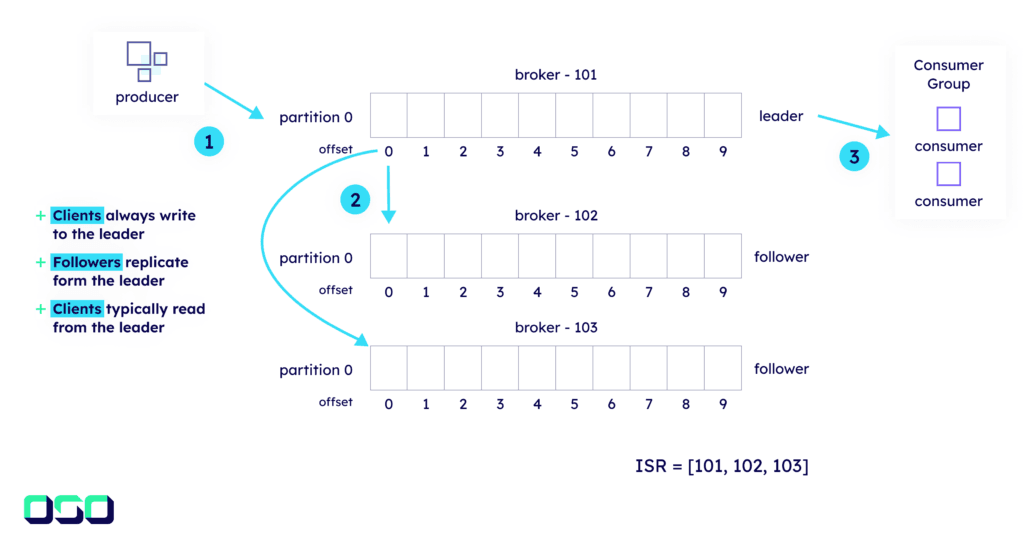
Kafka’s data replication protocol is crucial for durability and availability in mission-critical applications. When creating a topic, users specify the number of replicas. A leader replica handles data from producers, while followers fetch and replicate this data.
In-sync replicas (ISR): the set of replicas fully caught up with the leader.
Leader and followers: the leader manages data writes, while followers replicate them.
Leader epoch: a monotonically increasing number marking a leader’s generation.
High watermark: marks committed records available to consumers.
What happens during replication?
The leader handles producer requests and appends data to its log.
Followers fetch data from the leader and append it to their logs.
Records are committed when they are present in all ISR replicas.
The high watermark advances as records are confirmed by followers.
When a partition leader fails, the KRaft controller elects a new leader from the ISR replicas. Data reconciliation ensures followers’ logs match the new leader’s log by truncating uncommitted data and fetching updates.
What is the Kafka control plane?
Kafka’s control plane manages cluster metadata. Kafka originally relied on ZooKeeper, but KRaft (Kafka Raft) mode removes this dependency by running a Raft-based consensus service inside Kafka itself.
Why does KRaft matter?
It simplifies operations by removing the need to manage ZooKeeper.
It makes metadata handling more efficient and scalable.
How is KRaft configured and managed?
Deployment: controllers can run on dedicated nodes or in combined mode alongside brokers.
Failover: controllers keep an in-memory metadata cache for quick controller failover.
Metadata log: metadata changes are logged in a special single-partition internal topic, __cluster_metadata. Metadata replication mimics data replication but uses a quorum-based system without ISR.
Leader election: follows a quorum-based approach with vote requests and responses among controllers; the new leader coordinates log reconciliation to ensure consistency.
Snapshots: periodic snapshots prevent indefinite growth of the metadata log and help rebuild in-memory metadata caches on broker restarts and during metadata fetches.
ZooKeeper is gone in Kafka 4.0: the first version of this guide said Kafka 4.0 will drop ZooKeeper. Apache Kafka 4.0 was released on 18 March 2025 and runs only in KRaft mode: there is no ZooKeeper mode and no migration path inside 4.x. Clusters still on ZooKeeper must migrate to KRaft on a 3.x bridge release (such as 3.9) before upgrading to 4.0.
How do consumer groups work?
To enable scalability and parallel data processing, Kafka has the concept of consumer groups. A consumer group divides the topic data across multiple consumer instances, each assigned to process a subset of partitions. The group coordinator manages this process by assigning partitions to consumers, monitoring them and rebalancing when something changes, such as group membership.
How is a group initialised?
New consumers find the group coordinator for their consumer group (a broker chosen from the group ID).
In the classic protocol, a group leader selected from the online consumers assigns partitions to individual consumers using a pluggable strategy.
What does the group coordinator do?
It is responsible for managing group membership and partition assignment.
Its state, including committed offsets, is stored in the internal __consumer_offsets topic.
Each coordinator manages the groups whose IDs map to it.
Which partition assignment strategies are there?
Strategy
How it assigns partitions
Best for
Range
A continuous range of partitions per topic to each consumer
Processing related data together (co-partitioned topics)
Round robin
Distributes partitions evenly across consumers
High-throughput parallel processing
Sticky
Keeps existing assignments where possible during rebalances
Reducing partition movement
Cooperative sticky
Sticky, plus incremental cooperative rebalances
Uninterrupted consumption from partitions that are not being reassigned
There are several important aspects to consider when selecting a partition assignment strategy:
Message ordering: Kafka only guarantees message ordering within a single partition.
Scalability: active consumers in a group cannot exceed the number of partitions; extra consumers sit idle.
Load balancing: the assignment strategy affects how evenly the workload is distributed across consumers.
Stateful services: where partition assignments matter to the application logic, a sticky assignor (preferably cooperative sticky) is recommended, as it keeps assignments across rebalances while still ensuring even distribution.
How does offset tracking work?
A consumer offset tracks the position up to which messages have been consumed from a partition. It serves as a bookmark indicating where a consumer should resume reading after a pause or failure.
Each consumer group maintains its own offset for every partition it consumes.
Offsets are stored in the internal __consumer_offsets topic.
The offset is an integer that uniquely identifies each message within a partition.
As consumers read messages, they advance their offset linearly and periodically commit their position.
The offset is controlled by the consumer, so it can rewind or skip ahead if needed.
What triggers a rebalance?
A consumer fails, restarts, joins or leaves the group.
Partitions are added to a subscribed topic.
With the classic eager protocol, a rebalance pauses processing for the whole group until assignments are rebuilt. Cooperative sticky assignment avoids this for unaffected partitions, and the next-generation consumer rebalance protocol (KIP-848, generally available in Kafka 4.0 with group.protocol=consumer) removes stop-the-world rebalances.
How do acks and idempotence protect your data?
Apache Kafka ensures high availability and resilience through replication: N replicas on a topic tolerate N-1 failures. When a producer writes an event to a topic, the acknowledgement of that write is configurable through the producer property acks, from 0 (no durability, low latency) to all (high durability, higher latency), which ensures the data has been written to all in-sync replicas before proceeding.
Setting
Behaviour
acks=0 (fire and forget)
The producer doesn’t wait for any acknowledgement
acks=1 (leader acknowledgement)
The producer waits for the partition leader only
acks=all (all replicas)
The producer waits for all in-sync replicas
In applications where losing data is unacceptable, setting min.insync.replicas to more than 1 ensures records are only acknowledged once they are replicated to that number of replicas. Ordering guarantees are normally maintained, but network failures and retries can lead to duplication and reordering.
To mitigate this, Kafka supports idempotent producers, which assign a producer ID and sequence number to each batch, preventing duplicates and maintaining order even during retries. To guarantee ordering for messages with the same key, enable idempotence and set acks=all (both are producer defaults since Kafka 3.0).
How do Kafka transactions work?
Kafka transactions provide atomic writes across multiple topics and partitions, ensuring data consistency and exactly-once processing semantics. They simplify application logic and behave like a database on failure, with a complete rollback.
Transactions are designed to enable exactly-once semantics, so an application can process events and write the results to an output topic only once. You enable this on each transactional producer by setting a unique transactional.id. Consumers using read_committed then only see committed data.
Scenario
Description
Failure without transactions
Results in duplicates and inconsistencies when the application restarts
Failure with transactions
The transaction coordinator manages the producer ID and transaction state, and uncommitted data is not exposed to read_committed consumers
Successful transaction
The coordinator writes the commit to the transaction log and the data is exposed to consumers; brokers maintain the last stable offset to ensure read consistency
Consuming with read_committed
Only committed records are read and aborted transactions are filtered out, using the last stable offset (LSO)
Idempotent producers
Records are tagged with a producer ID and sequence number, so duplicates are prevented and order is maintained during failures
Transaction commit intervals
Balance consistency overhead against latency with commit.interval.ms (Kafka Streams) and transaction.timeout.ms
External systems
Kafka transactions only cover Kafka itself; to include database calls, use a two-phase strategy or the outbox pattern
How does topic compaction work?
Topic compaction retains the latest record for each key while removing older records with the same key, regardless of the retention period. This is particularly useful for state-based data, or when only the latest update for each key matters.
A compacted log consists of two parts. The head is where new records are appended and may contain duplicate keys. The tail contains only unique keys after compaction has run.
All messages in a compacted topic must have keys.
Kafka periodically scans log segments to find messages with duplicate keys.
When duplicates are found, only the most recent message for each key is retained.
Older messages with the same key are removed during compaction.
Logs are divided into clean segments (no duplicates) and dirty segments (which may contain duplicates). Cleaned segments are swapped in for the older ones, and consumers read from the updated segments.
Tombstones and transaction markers: a tombstone is a message with a key and a null value that signals deletion of all messages with that key. Tombstones are only removed after a delay (delete.retention.ms), so consumers have time to read the deletion. Compacted topics that contain transactional control records also need special handling: records from transactions that are still open are preserved until the transaction completes, and transaction markers are only removed once they are no longer needed.
Which settings control compaction?
cleanup.policy=compact: enables compaction at topic level.
log.cleaner.enable: must be true on the brokers (the default).
min.cleanable.dirty.ratio (broker default log.cleaner.min.cleanable.ratio): controls when compaction is triggered.
min.compaction.lag.ms: the minimum time before messages become eligible for compaction.
What is tiered storage in Kafka?
Tiered storage, introduced as an early access feature in Kafka 3.6, was promoted to production-ready status in the 3.9 release. It supports more cloud-native deployments and addresses three limitations of the original storage design:
Cost: local block storage is expensive compared with object storage.
Elasticity: adding storage meant operational work across all brokers.
Isolation: reading old data from local disk can cause performance issues.
Tiered storage operates across two tiers:
Local tier: fast, expensive storage (such as SSD or NVMe) for recent, frequently accessed data.
Remote tier: slower, cost-effective storage (such as S3 or HDFS) for historical data.
How does tiered storage store and retrieve data?
New data is initially written to the local tier on Kafka brokers.
All segments except the active segment are asynchronously copied to remote storage.
Local copies are deleted according to the local retention settings (local.retention.ms and local.retention.bytes), while remote data follows the overall retention.
Only one copy of each segment is uploaded to remote storage, regardless of replication factor.
Recent data is served from local storage using standard Kafka mechanisms.
When consumers request historical data, brokers fetch it from remote storage and cache it locally, so later reads of the same data are faster.
What are the limitations of tiered storage?
It does not support compacted topics.
Tiered storage enabled topics must be deleted before tiered storage can be disabled at broker level.
Increasing local retention doesn’t move remote segments back to local storage.
Updated for Kafka 3.9: the original guide said tiered storage cannot be switched off without support intervention. Since Kafka 3.9 (KIP-950), tiered storage can be disabled and re-enabled per topic in KRaft mode: remote.log.copy.disable=true makes remote data read-only, and remote.storage.enable=false with remote.log.delete.on.disable=true removes it (Kafka 3.9 tiered storage docs). The earlier “no JBOD” limitation is also no longer listed there.
How do you scale a Kafka cluster?
Kafka can be scaled up and down by adding and removing brokers. This should NOT be done dynamically by a metric-driven approach, no matter who tells you. Adding and removing brokers requires redistributing data to maintain balance, and over time data can become unevenly distributed. Rebalancing takes time and resources from every broker and should be a planned activity.
Which tools help rebalance a cluster?
Kafka reassignment tool (kafka-reassign-partitions.sh): manages partition distribution and replication by moving partitions between brokers and adjusting replication factors. It uses a JSON file to specify new replica assignments.
Confluent Auto Data Balancer: a Confluent-only tool that balances data across brokers and racks to even out leader partitions, disk usage and resource utilisation.
Self-Balancing Clusters: Confluent agents monitor and continuously adjust cluster balance with minimal manual intervention.
Should you use RAID or JBOD?
If you use local storage, you must decide between JBOD and RAID. This comes down to your specific use case.
Option
Pros
Cons
Recommendation
RAID 10
Best balance of performance and redundancy; good load balancing among disks; good protection against disk failures
Higher cost because of reduced usable capacity
Preferred if budget allows
RAID 1
Basic mirroring with redundancy and less complexity
Less performance than RAID 10
Second choice; good for smaller deployments
RAID 0
Good performance
No redundancy; higher risk
Third choice
RAID 5/6
Capacity efficient
Significant write throughput penalty; high I/O cost during rebuilds; poor performance during disk failures
Not recommended for Kafka
If you plan to use JBOD, take these limitations into account:
JBOD does not automatically balance load across disks like RAID 10.
Disk space needs manual monitoring and management.
Kafka won’t automatically redistribute partitions if one disk gets full; a partition stays on its assigned disk.
Best practices: monitor disk usage actively across all volumes, balance load between disks manually, use separate I/O paths for each disk, avoid network-attached storage (NAS) and use a replication factor of at least 3.
What are the Kafka disaster recovery options?
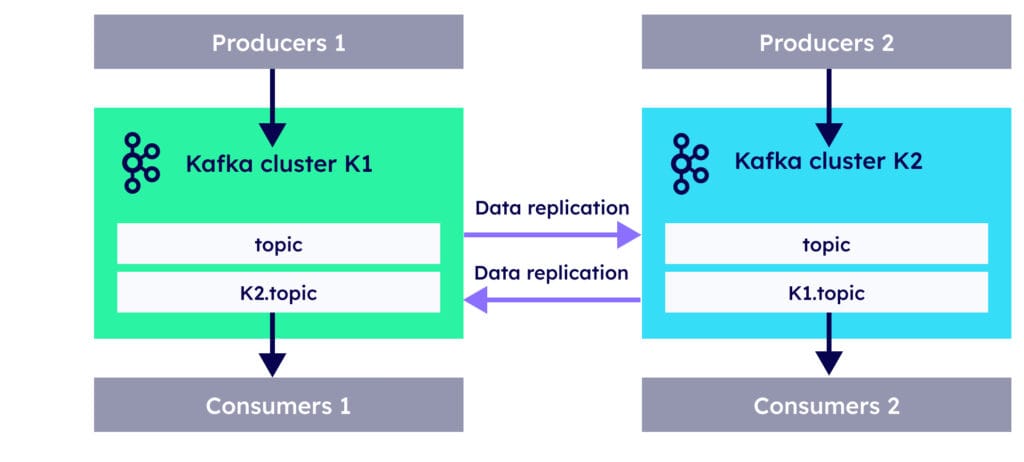
Apache Kafka disaster recovery (DR) covers a range of strategies and architectures to ensure business continuity in case of catastrophic failures. Replicating to different geographic regions keeps data available across regions and can lower latency for remote users. You should know the different types of replication:
What is Cluster Linking?
Cluster Linking (Confluent) creates a persistent bridge between Kafka clusters, enabling:
Direct cluster-to-cluster connections without additional components.
Byte-for-byte replication of topics.
Preservation of message partitions and offsets.
Replication run by the brokers themselves, with no separate Connect cluster.
Advantages of this approach include tolerance of network latency and unreliable networks, more efficient handling of compressed messages (no decompression and recompression), and automatic recovery after reconnections.
What does Confluent Replicator offer?
Built as an enterprise-grade solution for cross-datacenter replication, Confluent Replicator has some useful features compared with open source equivalents:
Integrates with Kafka Connect and Confluent Control Center.
Provides centralised configuration management and monitoring.
Handles both topic configuration and data replication.
Offers easier deployment and configuration, with GUI-based monitoring in Control Center.
What is MirrorMaker 2?
MirrorMaker 2 is built on the Kafka Connect framework and offers significant improvements over its predecessor. Important features to remember:
Offsets are not preserved byte-for-byte; consumer offsets are translated through checkpoints, which needs configuring.
Dynamic configuration changes, with bidirectional replication capabilities.
Topic renaming and filtering, much like Confluent Replicator.
Feature
MirrorMaker 2
Confluent Replicator
Topic auto-detection
Yes
Yes
Configuration sync
Yes
Yes
ACL management
Yes
Yes
GUI monitoring
No
Yes
Support
Community
Commercial
What is a stretch cluster?
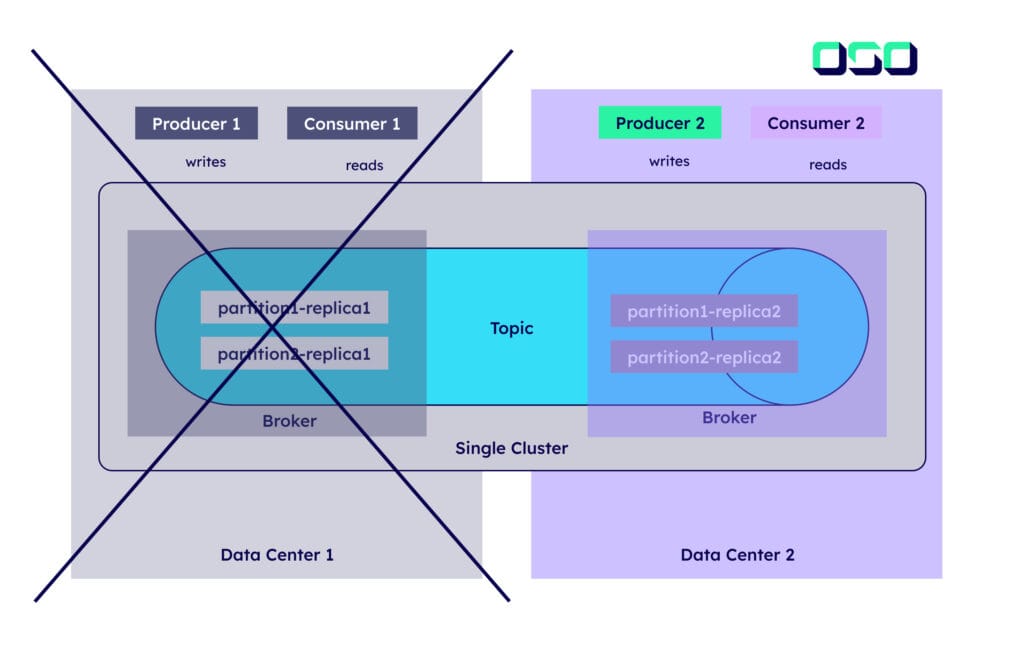
A stretched Kafka cluster is a single logical cluster deployed across multiple datacentres or availability zones, with synchronous replication between sites. The cluster operates as one system, with replicas distributed evenly across physical locations using Kafka’s rack awareness.
Demands low latency between datacentres (recommended maximum 50 ms).
Requires stable, high-bandwidth connections between sites.
Provides strong data durability through synchronous replication.
Enables automatic failover when a datacentre fails.
Client applications remain unaware of multiple datacentres.
Requires careful configuration of min.insync.replicas, typically with acks=all for maximum durability.
Where can you find CCDAK sample exam questions?
Thank you to Daniel Sobrado for putting together a great repository full of Confluent Kafka questions to practise. These are scenario-based questions to help you understand the kind of questions you may face. You can find them at github.com/danielsobrado/CCDAK-Exam-Questions.
Key takeaway: CCDAK rewards understanding over memorisation. Know how requests, replication, KRaft and consumer groups work, when to use acks=all, idempotence and transactions, and what compaction and tiered storage can and cannot do, then test yourself with scenario-based questions.
Frequently asked questions
What is the CCDAK certification?
CCDAK is the Confluent Certified Developer for Apache Kafka exam. It tests whether you understand how to build applications on Kafka: brokers, replication, producers and consumers, consumer groups, transactions, compaction and related platform features.
Does the CCDAK exam still cover ZooKeeper?
Study KRaft first. Apache Kafka 4.0, released in March 2025, removed ZooKeeper completely, so modern Kafka runs only in KRaft mode. Knowing why ZooKeeper was replaced and how the KRaft metadata quorum works is the useful part.
What is the difference between acks=1 and acks=all?
With acks=1 the producer waits only for the partition leader, so data can be lost if the leader fails before replicating. With acks=all it waits for all in-sync replicas, which, combined with min.insync.replicas of 2 or more, protects against that loss.
Can tiered storage be disabled in Kafka?
Yes, since Kafka 3.9 in KRaft mode. Per topic, remote.log.copy.disable=true stops uploads and keeps remote data read-only, while remote.storage.enable=false with remote.log.delete.on.disable=true removes the remote data.
Where can I practise CCDAK exam questions?
Daniel Sobrado’s CCDAK-Exam-Questions repository on GitHub has a large set of scenario-based practice questions. Use them after you understand the topics in this guide, and review why each wrong answer is wrong.